
724Claw
5|0 reviews|0 favorites
Introduction
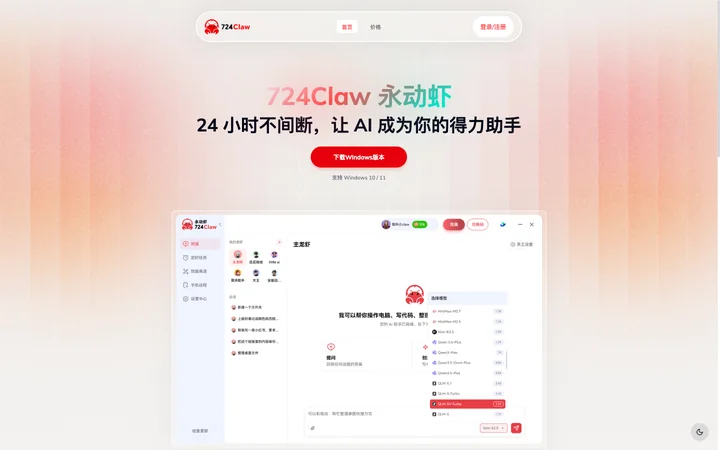
724Claw is a Windows desktop wrapper for OpenClaw, ready to use out of the box with no configuration required. It supports direct AI model connections, scheduled tasks, a Skills app store, and one-click integration with QQ, Feishu, and DingTalk.
Listed on
July 22, 2026
What is 724Claw?
724Claw is a Windows desktop wrapper for OpenClaw, designed to provide users with an out-of-the-box AI assistant that requires no complex configuration. It supports seamless switching between multiple cutting-edge large models, and integrates scheduled task management, a Skills plugin store, and multi-platform message integration (QQ, Feishu, DingTalk), helping users achieve 24-hour uninterrupted automated workflows.
How to use 724Claw?
- Users can directly download the Windows version from the official website (supports Windows 10/11) and use it after installation. No additional configuration is needed. Install required skill plugins through the built-in Skills store, set up scheduled tasks, and configure QQ, Feishu, or DingTalk integration to receive messages. Choose a free or paid subscription plan based on your needs to get corresponding model access permissions and Shrimp Coin quotas.
Core features of 724Claw
- Skills Store: Rich skill plugins, one-click installation, unlimited possibilities
- Scheduled Task Management: Flexible task scheduling, let AI work for you automatically
- Multi-platform Integration: Quick configuration for QQ, Feishu, DingTalk, instant message delivery
- Supports Multiple Cutting-edge Large Models: Seamless switching between Qwen, MiniMax, Kimi, GLM, DeepSeek, etc.
- Built-in Monitoring Dashboard: Real-time monitoring of AI running status
User reviews
5.0
/ 50 reviews
5 stars
0
4 stars
0
3 stars
0
2 stars
0
1 stars
0
No reviews yet. Be the first to write one.
Similar products







724Claw Embed
Add a website badge to show your product on Hootool—help others find the right AI tool for their problem. Easy to place on your homepage or footer.