

SQWK

SQWK

5|0 reviews|0 favorites
Visit website
Introduction
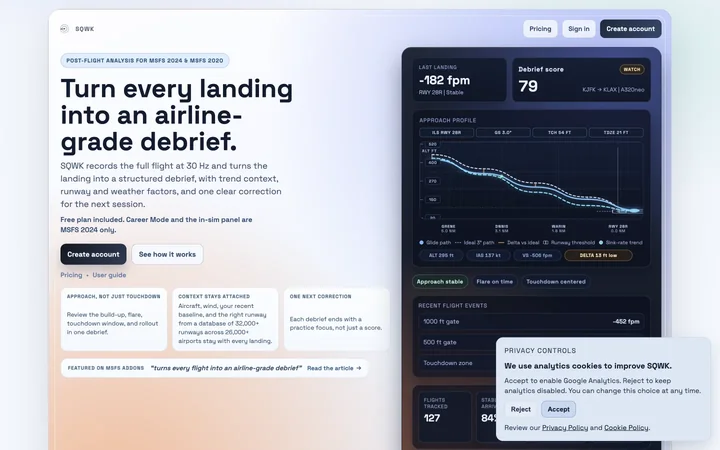
SQWK gives serious MSFS pilots an airline-grade post-flight debrief: approach reconstruction, landing analysis, and trend tracking for 115+ aircraft profiles.
Listed on
July 22, 2026

What is SQWK?

SQWK is a post-flight analysis tool for Microsoft Flight Simulator 2024 and 2020. It records the full flight at 30 Hz and turns the landing into a structured debrief, with trend context, runway and weather factors, and one clear correction for the next session. It provides airline-style flight data monitoring, including approach analysis, exceedance tracking, and technique improvement.

How to use SQWK?

  • 1. Create a free account on the SQWK website. 2. Download and install the Windows exporter and in-sim panel (one installer). 3. Sign in from the exporter and approve in your browser. 4. Fly in MSFS; flights upload automatically after landing. 5. Open your dashboard to review the debrief, charts, and leaderboards.

Core features of SQWK

  • Full-flight 30 Hz telemetry recording and cloud replay
  • 12 scored metrics (landing rate, G-force, centerline, flare, etc.)
  • 115+ aircraft-specific profiles with POH-tuned scoring
  • 32,000+ runway database for accurate touchdown zone analysis
  • 3D approach view and route map with scrub/rewind
  • Weekly and monthly Flying Reports with trends and records
  • Shareable cards and public read-only links
  • Monthly leaderboards for aircraft, runway, and route

User reviews

5.0

/ 5

0 reviews

5 stars
0
4 stars
0
3 stars
0
2 stars
0
1 stars
0

No reviews yet. Be the first to write one.

Similar products

SQWK Embed

Add a website badge to show your product on Hootool—help others find the right AI tool for their problem. Easy to place on your homepage or footer.

Featured on

Hootool.ai