Anycast With ChatGPT
5|0 reviews|0 favorites
Introduction
Anycast With ChatGPT, enjoy a new editing experience with AI conversation, efficient, intelligent, and smooth.
Listed on
July 22, 2026
What is Anycast With ChatGPT?
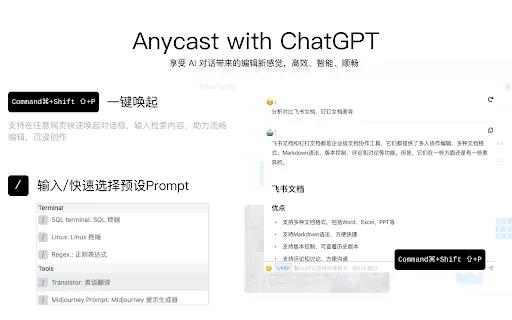
Anycast With ChatGPT is a Chrome browser extension designed to enhance users' editing and creative efficiency through AI conversation. It allows users to quickly summon a dialog box on any webpage, input search content, and supports quick selection of preset prompts. It includes built-in JS console, SQL terminal, Linux terminal, and development daily tools for UI, UE, FE, etc. The extension also supports one-click copy, re-response, and other quick input/output methods.
How to use Anycast With ChatGPT?
- 1. After installing the extension, use the Command+Shift+P shortcut to summon the dialog box on any webpage. 2. Enter search content or editing instructions to have a conversation with AI. 3. Type / to quickly select preset prompts, such as JS console, SQL terminal, Linux terminal, etc. 4. Use one-click copy, re-response, and other shortcuts to handle AI replies.
Core features of Anycast With ChatGPT
- Command+Shift+P to summon the dialog box on any webpage
- Type / to quickly select preset prompts
- Built-in JS console, SQL terminal, Linux terminal, and other development tools
- Supports daily development tools for UI, UE, FE, etc.
- One-click copy, re-response, and other quick input/output methods
User reviews
5.0
/ 50 reviews
5 stars
0
4 stars
0
3 stars
0
2 stars
0
1 stars
0
No reviews yet. Be the first to write one.
Similar products







Anycast With ChatGPT Embed
Add a website badge to show your product on Hootool—help others find the right AI tool for their problem. Easy to place on your homepage or footer.