
Supercut – Screen Recorder & Camera Capture
5|0 reviews|0 favorites
Introduction
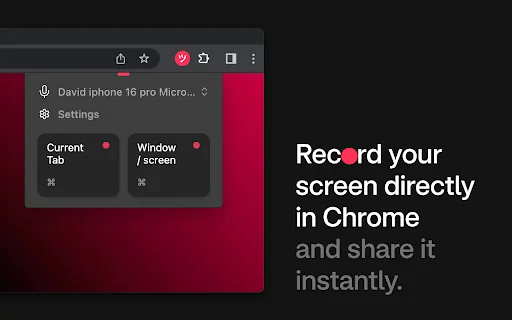
The fastest way to share your screen & camera to create professional-looking video for both internal and external communication.
Listed on
July 22, 2026
What is Supercut – Screen Recorder & Camera Capture?
Supercut is a Chrome extension that allows you to record your screen and camera to create professional-looking videos. It is designed for team communication, product demos, sales pitches, customer support, training, and marketing content. The extension offers instant video sharing, analytics, AI-powered features, and team collaboration tools.
How to use Supercut – Screen Recorder & Camera Capture?
- Install the Supercut extension from the Chrome Web Store, then use it to record your screen and camera. After recording, you can instantly share the video via a trackable link, add comments and reactions, and leverage AI features like auto-chapters and closed captions. For higher resolution and offline recording, you can download the native apps for Mac or Windows from supercut.ai.
Core features of Supercut – Screen Recorder & Camera Capture
- Instant video sharing with trackable links
- Visitor & Advanced engagement analytics
- Comments & Reactions
- Team collaboration tools and permissions
- Call-to-action buttons for better conversion
- Automatic AI generated chapters & title
- Automatic closed captions in multiple languages
- Noise reduction and audio enhancement
- Keyboard shortcuts for power users
- AI-powered auto-editing
User reviews
5.0
/ 50 reviews
5 stars
0
4 stars
0
3 stars
0
2 stars
0
1 stars
0
No reviews yet. Be the first to write one.
Similar products




Supercut – Screen Recorder & Camera Capture Embed
Add a website badge to show your product on Hootool—help others find the right AI tool for their problem. Easy to place on your homepage or footer.