

ChatGPT for Outlook

ChatGPT for Outlook

5|0 reviews|0 favorites
Visit website
Introduction
AI Add-in for Outlook that uses ChatGPT to process emails with custom prompts.
Listed on
July 23, 2026

What is ChatGPT for Outlook?

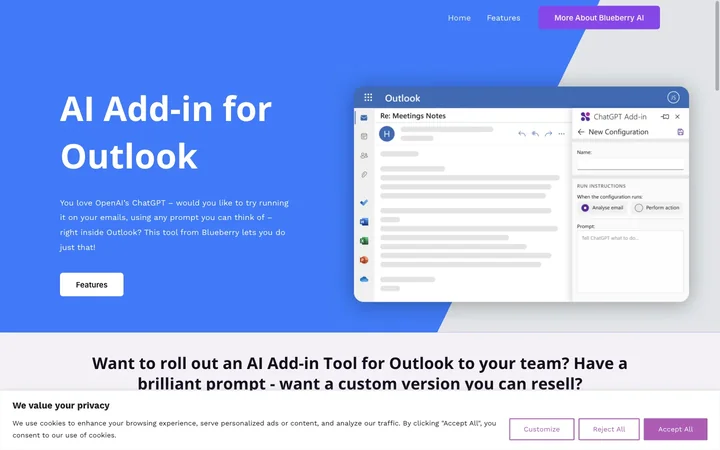
ChatGPT for Outlook is an AI add-in for Microsoft Outlook that integrates OpenAI's ChatGPT to help users manage and process emails. It allows users to create custom prompts to generate summaries, highlights, or other outputs based on email content. The add-in can process entire emails or specific parts, display results in a separate window, and even update email importance flags.

How to use ChatGPT for Outlook?

  • To use the add-in, copy the Manifest URL into your custom add-in link in Outlook and enter your ChatGPT API key. Once installed, you can create custom prompts to guide ChatGPT in processing emails, choose which parts of the email to process, and view the output in a separate window or replace the email body.

Core features of ChatGPT for Outlook

  • Custom prompts to guide ChatGPT for summaries or highlights
  • Process entire email or specific parts (body, subject, attachments)
  • Display output in a separate window or replace email body
  • Automatically update email importance (flag as high priority)
  • Manage multiple configurations for different scenarios
  • Simple setup with Manifest URL and API key

User reviews

5.0

/ 5

0 reviews

5 stars
0
4 stars
0
3 stars
0
2 stars
0
1 stars
0

No reviews yet. Be the first to write one.

Similar products

ChatGPT for Outlook Embed

Add a website badge to show your product on Hootool—help others find the right AI tool for their problem. Easy to place on your homepage or footer.


Featured on

Hootool.ai