

AI Sidebar

AI Sidebar

5|0 reviews|0 favorites
Visit website
Introduction
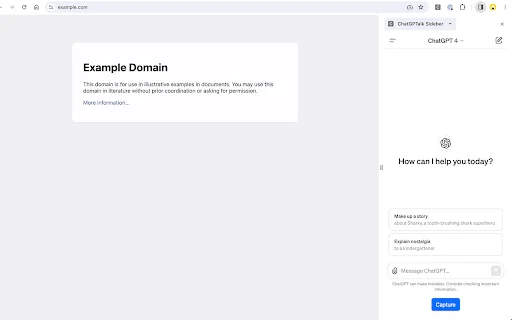
AI Sidebar is a Chrome sidebar extension that captures web page main text and YouTube subtitles with one click and sends them to ChatGPT or Gemini for summarization.
Listed on
July 23, 2026

What is AI Sidebar?

AI Sidebar is a Chrome browser sidebar extension that helps users quickly summarize web content. It can extract the main text of a web page or YouTube subtitles into the input box of ChatGPT or Gemini. Without manual copying and pasting, users can summarize, ask questions, and understand content.

How to use AI Sidebar?

  • Install AI Sidebar from the Chrome Web Store and pin it to the browser. Open the web page or YouTube video you want to summarize, and click the Capture button in the sidebar. Select ChatGPT or Gemini as the AI engine; the extension automatically extracts the main text or subtitles and fills them into the input box. Send the prompt to get a summary or continue the conversation.

Core features of AI Sidebar

  • Launch ChatGPT or Gemini in the browser sidebar
  • Automatically capture web page main text and fill it into the AI input box
  • Built-in summary prompt templates for one-click summarization
  • Capture YouTube subtitles and send them to AI
  • Automatically split and send long text

User reviews

5.0

/ 5

0 reviews

5 stars
0
4 stars
0
3 stars
0
2 stars
0
1 stars
0

No reviews yet. Be the first to write one.

Similar products

AI Sidebar Embed

Add a website badge to show your product on Hootool—help others find the right AI tool for their problem. Easy to place on your homepage or footer.


Featured on

Hootool.ai