
RightBlogger
5|0 reviews|0 favorites
Introduction
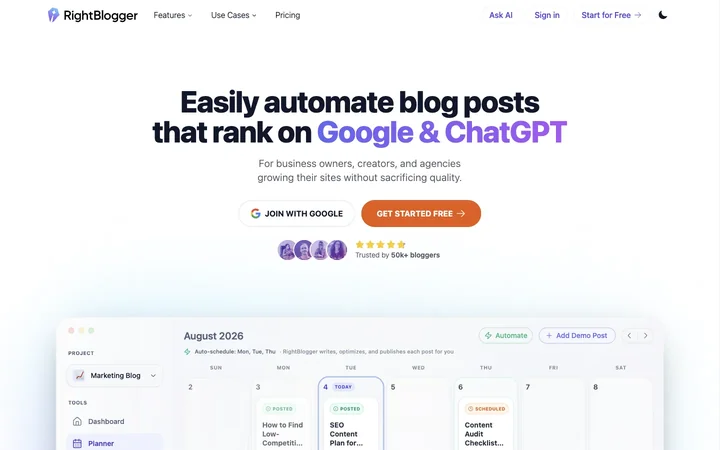
RightBlogger is an AI-powered blog automation platform that helps business owners, creators, and agencies research, write, optimize, and publish SEO-friendly content.
Listed on
July 22, 2026
What is RightBlogger?
RightBlogger is an all-in-one AI blog automation system designed for business owners, creators, and marketing agencies. It connects every step of blogging—keyword research, article writing, SEO optimization, scheduling, and publishing—into one workflow. The platform includes 90+ AI tools, autoblogging capabilities, social media automation, and a Site Agent for post-publish maintenance.
How to use RightBlogger?
- Start by connecting your CMS (WordPress, Webflow, Ghost, etc.) and setting up your brand voice with MyTone. Then configure automations by choosing topics, keywords, cadence, and publishing preferences. RightBlogger generates and schedules SEO-optimized articles automatically, which you can approve or let publish on autopilot. The Site Agent maintains posts with fixes like internal linking and broken-link cleanup.
Core features of RightBlogger
- Autoblogging Content Planner: Set up content strategy once, auto-generate and schedule SEO-focused articles
- AI Article Writer: Create 2,000+ word SEO blog posts from keywords in minutes
- MyTone: Learns your writing voice so AI drafts match your style
- Site Agent: Automated post-publish maintenance (fixes broken links, refreshes titles, sharpens meta descriptions)
- Social Media Automation: Auto-shares posts to X, LinkedIn, Facebook, and Threads
- Keyword Research: Real search volume and competition data
- CMS Integrations: WordPress, Shopify, Webflow, Ghost, Wix, Duda, Blogmaker, HighLevel, Notion
- White-label reporting for agencies
User reviews
5.0
/ 50 reviews
5 stars
0
4 stars
0
3 stars
0
2 stars
0
1 stars
0
No reviews yet. Be the first to write one.
Similar products



RightBlogger Embed
Add a website badge to show your product on Hootool—help others find the right AI tool for their problem. Easy to place on your homepage or footer.