
ChatGPT Batch Tasks Bulk Work flow Excel

ChatGPT Batch Tasks Bulk Work flow Excel

5|0 reviews|0 favorites
Visit website
Introduction
Chrome extension to run repeated ChatGPT tasks from Excel, CSV, and structured prompt lists.
Listed on
July 23, 2026

What is ChatGPT Batch Tasks Bulk Work flow Excel?

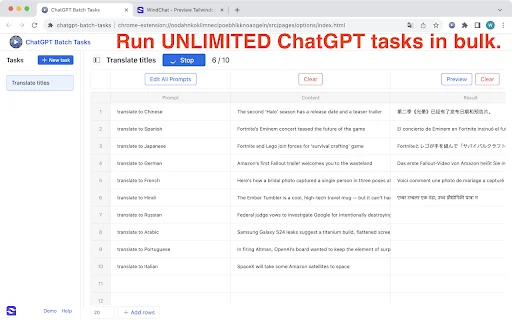
ChatGPT Batch Tasks Bulk Work flow Excel is a Chrome extension that enables users to run repeated ChatGPT tasks from spreadsheet data, such as Excel, CSV, and structured prompt lists. It helps process many prompts, keywords, titles, questions, summaries, translations, classifications, rewrites, and content ideas in an organized workflow. The extension reduces manual copy-paste work and turns spreadsheet-style input into a practical AI batch workflow for research, content operations, marketing, ecommerce, and daily productivity.

How to use ChatGPT Batch Tasks Bulk Work flow Excel?

  • Install the extension from the Chrome Web Store, then prepare your data in Excel, CSV, or structured prompt lists. Use the extension to load your spreadsheet rows and apply reusable prompt templates to run batch tasks through ChatGPT directly in Chrome. Review the AI output before publishing or using it for business decisions.

Core features of ChatGPT Batch Tasks Bulk Work flow Excel

  • Run repeated ChatGPT tasks from Excel, CSV, spreadsheet rows, and structured prompt lists
  • Process many prompts, keywords, titles, questions, summaries, translations, classifications, rewrites, and content ideas
  • Reduce manual copy-paste work for similar tasks
  • Turn spreadsheet-style input into a practical AI batch workflow
  • Support prompt management, batch AI processing, Excel productivity, CSV workflows, content production, and knowledge work

User reviews

5.0

/ 5

0 reviews

5 stars
0
4 stars
0
3 stars
0
2 stars
0
1 stars
0

No reviews yet. Be the first to write one.

Similar products

ChatGPT Batch Tasks Bulk Work flow Excel Embed

Add a website badge to show your product on Hootool—help others find the right AI tool for their problem. Easy to place on your homepage or footer.


Featured on

Hootool.ai