
Meshy
5|0 reviews|0 favorites
Introduction
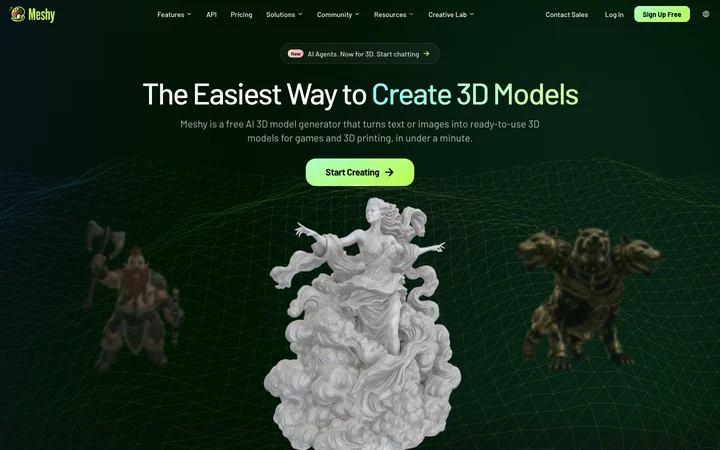
Meshy's AI 3D model generator turns text and images into production-ready 3D models in 20-30 seconds.
Listed on
July 22, 2026
What is Meshy?
Meshy is a 3D generative AI toolbox that lets you create high-quality 3D models and textures from text or images in minutes. It is designed for 3D artists, game developers, and 3D printing hobbyists, with no 3D modeling experience required. The platform includes tools for text-to-3D, image-to-3D, AI texturing, AI image generation, and animation.
How to use Meshy?
- To use Meshy, you can start by signing up for a free account. Then choose a tool such as Text to 3D, Image to 3D, or the 3D Agent. For Text to 3D, describe your object in natural language (up to 800 characters) and adjust settings like AI model version, model type, and pose. For Image to 3D, upload a PNG, JPG, or WebP image (up to 20 MB) and click Generate. After generation, preview the model in the 3D viewer, refine with AI Texturing or Remesh, and export in formats like FBX, OBJ, GLB, USDZ, STL, BLEND, or 3MF.
Core features of Meshy
- Text to 3D: Generate 3D models from text prompts in about a minute.
- Image to 3D: Convert a single photo or multiple views into a textured 3D model.
- AI Texturing: Add realistic PBR textures (albedo, normal, roughness, metallic) up to 8K resolution.
- AI Image Generator: Create multi-view concept art optimized for 3D creation.
- Animation: Auto-rig humanoid or quadruped characters and apply 500+ motion presets.
- 3D Agent: Conversational AI that brainstorms, generates concepts in batches, and answers 3D questions.
- API: Integrate Meshy's 3D AI into your app or pipeline.
- Export formats: FBX, OBJ, GLB, USDZ, STL, BLEND, 3MF.
User reviews
5.0
/ 50 reviews
5 stars
0
4 stars
0
3 stars
0
2 stars
0
1 stars
0
No reviews yet. Be the first to write one.
Similar products



Meshy Embed
Add a website badge to show your product on Hootool—help others find the right AI tool for their problem. Easy to place on your homepage or footer.