
Koko - Text improver

Koko - Text improver

5|0 reviews|0 favorites
Visit website
Introduction
Koko is an AI-powered Chrome extension that instantly improves text on web pages, with support for translation and copying.
Listed on
July 22, 2026

What is Koko - Text improver?

Koko - Text improver is a Chrome extension that uses advanced artificial intelligence technology to help users instantly improve their writing quality while browsing the web. It is suitable for various scenarios such as emails, blog posts, school assignments, and more, providing text enhancement, translation, and quick copy features. The extension prioritizes privacy; user text is not stored or used for other purposes.

How to use Koko - Text improver?

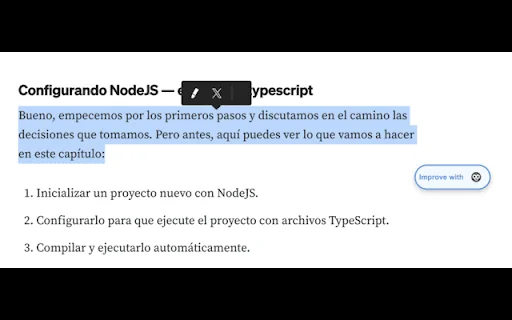
  • 1. Select any text on a web page. 2. Click the 'Improve with Koko' button that appears. 3. Wait for Koko to analyze and enhance the text. 4. Copy the improved text or translate it as needed.

Core features of Koko - Text improver

  • Instant text enhancement: Improve text with one click after selection.
  • AI-driven suggestions: Leverage advanced language models for high-quality improvements.
  • Easy-to-use interface: A clean button appears when text is selected, seamlessly integrated.
  • Quick copy function: Copy improved text with one click.
  • Built-in translation: Translate improved text into multiple languages.
  • Privacy-focused: Text is processed securely, not stored or used for other purposes.
  • Available everywhere: Works on any website, including Gmail, Google Docs, Twitter, LinkedIn, and more.

User reviews

5.0

/ 5

0 reviews

5 stars
0
4 stars
0
3 stars
0
2 stars
0
1 stars
0

No reviews yet. Be the first to write one.

Similar products

Koko - Text improver Embed

Add a website badge to show your product on Hootool—help others find the right AI tool for their problem. Easy to place on your homepage or footer.
Featured on

Hootool.ai