
ChatGPT: RePrompt
5|0 reviews|0 favorites
Introduction
RePrompt is a productivity tool for ChatGPT to parameterise your prompts for optimal reusability.
Listed on
July 22, 2026
Browser ExtensionAI Prompt Tools
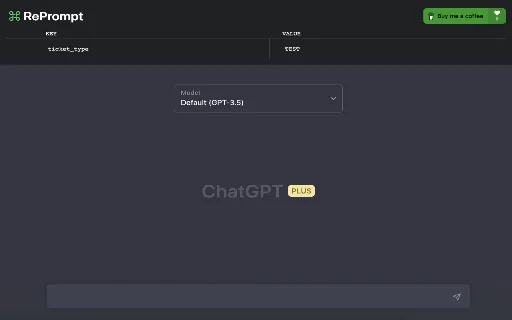
What is ChatGPT: RePrompt?
RePrompt is a browser extension that allows users to parameterise their prompts for reuse in ChatGPT. It helps save time and streamline workflow by eliminating repetition and enhancing reusability. Users can define parameters with default values and reference them in prompts using double curly brackets.
How to use ChatGPT: RePrompt?
- Install the RePrompt extension for your preferred browser (Google Chrome, Mozilla Firefox, or The Browser Company Arc). Open ChatGPT. In the RePrompt parameter manager, create a new parameter by typing in either the 'KEY' or 'VALUE' fields. Give your parameter a name and a default value. In your prompt, reference the parameter by adding double curly brackets around the parameter name, like {{parameter_name}}. When you're ready to send your prompt, make sure the parameter has the correct value in the RePrompt parameter manager. Press send, and the parameter will get replaced by its corresponding value in your prompt.
Core features of ChatGPT: RePrompt
- Parameterise prompts with double curly brackets ({{parameter_name}})
- Manage parameters via a dedicated parameter manager
- Assign default values to parameters
- Automatic replacement of parameters with values when sending prompts
- Supports multiple browsers: Chrome, Firefox, Arc
User reviews
5.0
/ 50 reviews
5 stars
0
4 stars
0
3 stars
0
2 stars
0
1 stars
0
No reviews yet. Be the first to write one.
Similar products






ChatGPT: RePrompt Embed
Add a website badge to show your product on Hootool—help others find the right AI tool for their problem. Easy to place on your homepage or footer.