
Subtitles.app

Subtitles.app

5|0 reviews|0 favorites
Visit website
Introduction
Free AI transcription tool: convert video and audio into text with word-level timestamps, support translation into 60+ languages, and export SRT, VTT, ASS, or TXT.
Listed on
July 23, 2026

What is Subtitles.app?

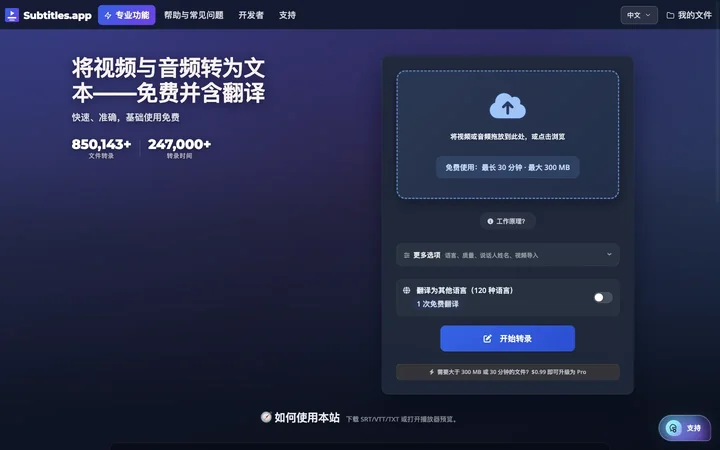
Subtitles.app is a free AI transcription and translation tool that converts video and audio files into text with word-level timestamps and supports translation into more than 60 languages. Users can upload files without creating an account or logging in and get studio-quality transcription results. The tool aims to make advanced AI tools accessible to everyone at a very low cost.

How to use Subtitles.app?

  • 1. Visit the Subtitles.app website. 2. Drag and drop a video or audio file onto the upload area, or click to browse and select a file. 3. Choose the file language (or auto-detect) and transcription quality (medium or highest). 4. Optionally enable speaker identification or translation into other languages. 5. Click the 'Start Transcription' button and wait for processing to complete. 6. Download the transcription result in SRT, VTT, ASS, or TXT format.

Core features of Subtitles.app

  • Free AI transcription supporting 100 languages
  • Word-level timestamps for precise alignment
  • Translation into 60+ languages
  • Export in SRT, VTT, ASS, TXT formats
  • No registration or login required
  • Speaker identification support (paid feature)
  • Privacy protection: free uploads are automatically deleted

User reviews

5.0

/ 5

0 reviews

5 stars
0
4 stars
0
3 stars
0
2 stars
0
1 stars
0

No reviews yet. Be the first to write one.

Similar products

Subtitles.app Embed

Add a website badge to show your product on Hootool—help others find the right AI tool for their problem. Easy to place on your homepage or footer.
Featured on

Hootool.ai