
Ethertext
5|0 reviews|0 favorites
Introduction
Ethertext is an AI clipboard tool for macOS that transforms text with one click, using AI models like OpenAI, Gemini, and Anthropic.
Listed on
July 22, 2026
What is Ethertext?
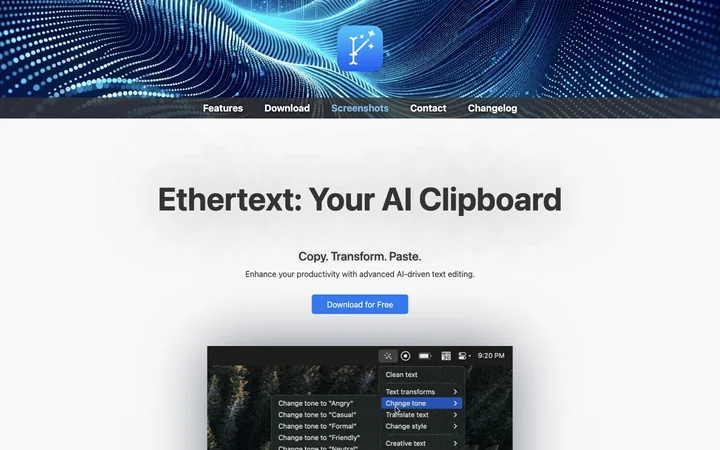
Ethertext is a macOS menu bar app that enhances your clipboard with AI-powered text editing. It lets you copy text, apply various transformations (like improving, translating, or coding), and paste the result. It supports multiple AI providers including OpenAI, Google Gemini, Anthropic, and local models via Ollama, and includes features like memorization, dictation, and screen capture.
How to use Ethertext?
- To use Ethertext, install it via Homebrew or download from the website. After installation, add your API keys for OpenAI, Google Gemini, or Anthropic in Settings, or enable Ollama for local AI. Then, copy text with ⌘C, click a transform from the dropdown, and paste with ⌘V. Use shortcuts like ⌘⇧T to clean text, ⌘⇧M to memorize, ⌘⇧D to dictate, ⌘⇧S to capture screen, and ⌘⇧R to recall.
Core features of Ethertext
- One-click text transformation with AI
- Customizable tone and style
- Code explanation, debugging, and translation
- Memorize and recall text
- Dictation and transcription
- Screen capture with text recognition
- Support for OpenAI, Google Gemini, Anthropic, and Ollama
- Keyboard shortcuts for quick actions
User reviews
5.0
/ 50 reviews
5 stars
0
4 stars
0
3 stars
0
2 stars
0
1 stars
0
No reviews yet. Be the first to write one.
Similar products






Ethertext Embed
Add a website badge to show your product on Hootool—help others find the right AI tool for their problem. Easy to place on your homepage or footer.