
Edit Videos Online
5|0 reviews|0 favorites
Introduction
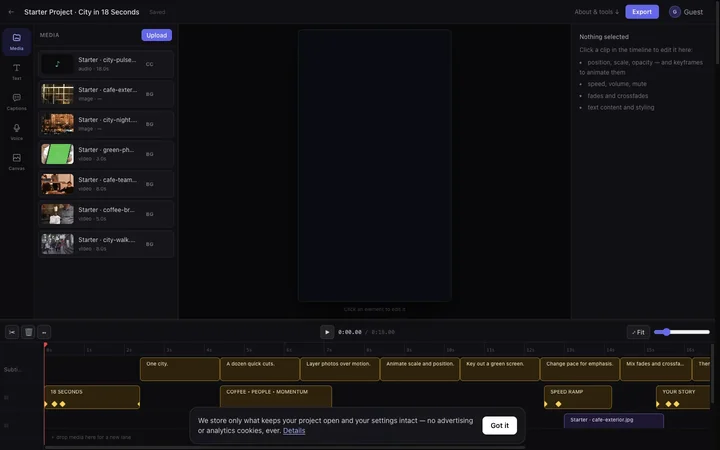
Edit video in your browser with a multi-track timeline, captions, audio and effects, or use a focused converter and background-removal tool.
Listed on
July 22, 2026
What is Edit Videos Online?
Edit Videos Online is a free browser-based video editor and a collection of focused media tools. It offers a multi-track timeline editor for trimming, splitting, adding captions, audio, and effects, as well as mini-tools for converting formats, compressing videos, removing backgrounds, generating subtitles, and more. The service emphasizes privacy, with no analytics or advertising scripts, and allows guest editing without an account.
How to use Edit Videos Online?
- To use the editor, drop a file onto the editor at the top of the page or create an empty project in your preferred aspect ratio. Arrange clips, split at the playhead, add captions, style text, and preview the complete story. Then choose a quality preset, let the queued render finish, and download the MP4. For mini-tools, upload your file, process it, and download the result directly; results expire after 24 hours.
Core features of Edit Videos Online
- Multi-track timeline editor with trim, split, and rearrange clips
- Timed captions with style customization
- Preview that carries through position, scale, opacity, text, transitions, and effects
- AI features: voiceover, speech transcription, background removal
- Guest editing without account; optional Google login for project persistence
- Export in vertical, landscape, square, or portrait formats as MP4
- 52 focused mini-tools for conversion, compression, background removal, subtitles, and text-to-speech
- Privacy-focused: no analytics or advertising cookies, private downloads
User reviews
5.0
/ 50 reviews
5 stars
0
4 stars
0
3 stars
0
2 stars
0
1 stars
0
No reviews yet. Be the first to write one.
Similar products



Edit Videos Online Embed
Add a website badge to show your product on Hootool—help others find the right AI tool for their problem. Easy to place on your homepage or footer.