
Voice Master: 语音识别和语音转文本转换器
5|0 reviews|0 favorites
Introduction
Free Chrome extension providing speech recognition (speech-to-text) that automatically inserts speech into web text fields and supports AI text correction.
Listed on
July 22, 2026
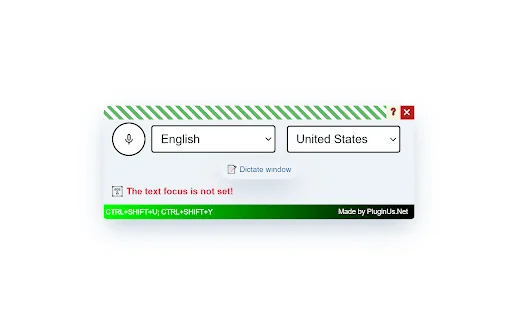
What is Voice Master: 语音识别和语音转文本转换器?
"Voice Master" is a free Chrome browser extension that provides speech recognition (speech-to-text). It converts what you say into text and can automatically insert it into any text field on a webpage or a dedicated dictation window. This lets you easily interact with AI platforms like ChatGPT, Claude, and DeepSeek just by speaking. Additionally, the extension includes built-in AI text correction (punctuation, formatting, word choice, and even correcting misrecognized words based on context) — you can connect your own OpenAI, Anthropic (Claude), or DeepSeek API key to enable it. For everyday dictation, no key is needed: without a key, the extension remains fully functional and completely free.
How to use Voice Master: 语音识别和语音转文本转换器?
- Install "Voice Master" like any other Chrome extension. After installation, you'll see a microphone icon; we recommend dragging it to the toolbar for quick access. Enable voice input: in the popup, switch the toggle to "on", then click the microphone icon. Select language: choose your desired input language, which can be Chinese or any other available language. Select input field: on the webpage, select where you want to enter text. Dictate text area: click the dedicated "Dictation Window" button, start speaking, and "Voice Master" will transcribe your speech into text. Turn off voice input: after speaking, click the microphone icon again to stop, or use the shortcut CTRL+SHIFT+Y.
Core features of Voice Master: 语音识别和语音转文本转换器
- Speech recognition (speech-to-text) that automatically inserts into web text fields
- Supports enabling voice input in any text field or input box
- Built-in AI text correction (punctuation, formatting, word choice) with support for OpenAI, Anthropic (Claude), or DeepSeek API keys
- Real-time improvement: each dictated sentence is sent to AI and inserted in corrected form
- Supports dictation in a separate window for easier text management
- Shortcuts: CTRL+SHIFT+U to show/hide panel, CTRL+SHIFT+Y to turn voice recognition on/off
- Interface translated into 17 languages
User reviews
5.0
/ 50 reviews
5 stars
0
4 stars
0
3 stars
0
2 stars
0
1 stars
0
No reviews yet. Be the first to write one.
Similar products

Voice Master: 语音识别和语音转文本转换器 Embed
Add a website badge to show your product on Hootool—help others find the right AI tool for their problem. Easy to place on your homepage or footer.