Full Picture: research, analyze with ChatGPT

Full Picture: research, analyze with ChatGPT

5|0 reviews|0 favorites
Visit website
Introduction
Read faster, understand better, research deeper: use ChatGPT to summarize, explain, check bias and get insights on news and articles
Listed on
July 23, 2026

What is Full Picture: research, analyze with ChatGPT?

Full Picture is a browser extension that uses OpenAI's GPT-3 technology to help you evaluate the text you are reading and make informed decisions about it. It allows you to quickly and easily see the various angles of any text, article, or news item you come across. It is designed to equip you with the tools you need to assess the credibility and accuracy of the information they are consuming.

How to use Full Picture: research, analyze with ChatGPT?

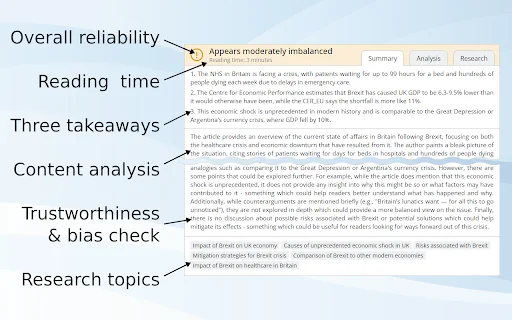
  • Install the extension from the Chrome Web Store, then click on the Full Picture icon while reading any article or news item. The extension will summarize the text into three bullet points, analyze it for biases and unsupported claims, assign a reliability rating, and provide six search keywords for further investigation.

Core features of Full Picture: research, analyze with ChatGPT

  • Summarizes text into easy-to-understand bullet points
  • Analyzes text for unsupported claims, biases, imbalanced reporting, and underrepresented points of view
  • Assigns a general reliability rating to the text
  • Provides six search keywords for further investigation
  • Powered by OpenAI's GPT-3 technology

User reviews

5.0

/ 5

0 reviews

5 stars
0
4 stars
0
3 stars
0
2 stars
0
1 stars
0

No reviews yet. Be the first to write one.

Similar products

Full Picture: research, analyze with ChatGPT Embed

Add a website badge to show your product on Hootool—help others find the right AI tool for their problem. Easy to place on your homepage or footer.

Featured on

Hootool.ai