
Cursor
5|0 reviews|0 favorites
Introduction
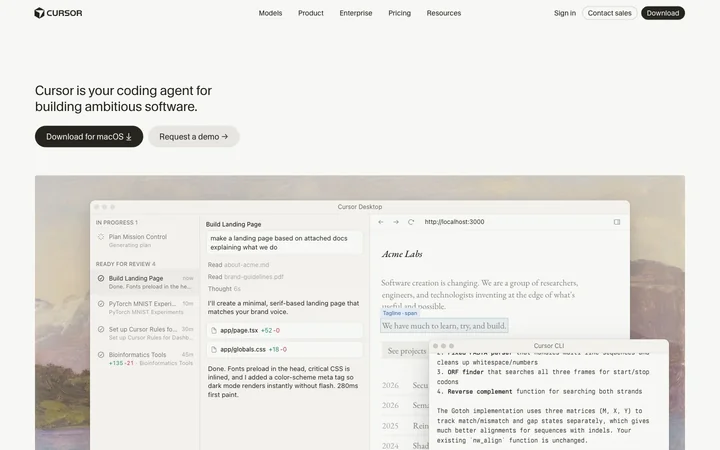
Cursor is an AI coding agent that helps developers build ambitious software.
Listed on
July 22, 2026
What is Cursor?
Cursor is an AI coding agent designed to boost developer productivity. It understands codebases and assists throughout the entire development lifecycle, from planning and coding to code review. Cursor offers multiple interfaces, including a desktop IDE, CLI, and cloud agents, and supports a variety of cutting-edge AI models.
How to use Cursor?
- 1. Visit cursor.com to download the Cursor desktop app for macOS or Windows.
- 2. After installation, start coding in the familiar editor environment, or use Cursor CLI to run agents in the terminal.
- 3. Describe tasks to Cursor in natural language, such as building features, fixing bugs, or planning projects.
- 4. Add context using @ mentions, image uploads, etc., so Cursor can precisely target the content that needs attention.
- 5. Choose from different plans based on your needs: Hobby (free), Pro, Teams, or Enterprise.
Core features of Cursor
- AI agent: autonomously plans, codes, tests, and demos features
- Multiple interfaces: desktop IDE, CLI, Web, and mobile
- Codebase understanding: quickly indexes and searches large codebases
- Multiple model choices: supports cutting-edge models like OpenAI, Anthropic, Gemini
- Automation: set up always-on agents to handle repetitive work
- Code review: Bugbot automatically reviews PRs
- Team collaboration: supports integrations with Slack, GitHub, etc.
User reviews
5.0
/ 50 reviews
5 stars
0
4 stars
0
3 stars
0
2 stars
0
1 stars
0
No reviews yet. Be the first to write one.
Similar products






Cursor Embed
Add a website badge to show your product on Hootool—help others find the right AI tool for their problem. Easy to place on your homepage or footer.