PI Summarize

PI Summarize

5|0 reviews|0 favorites
Visit website
Introduction
Chrome extension adding a right-click option 'Summarize' to get text summaries using ChatGPT, Gemini or Claude
Listed on
July 23, 2026

What is PI Summarize?

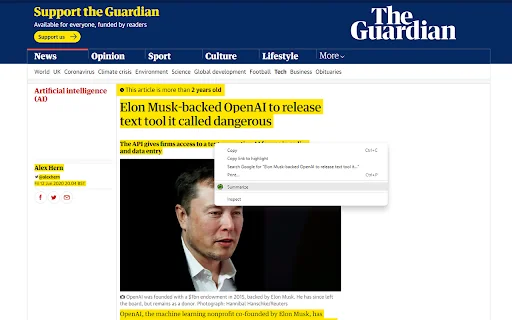
PI Summarize is a Chrome extension that adds a right-click option when text is selected on any webpage. After clicking 'Summarize', the extension redirects to ChatGPT, Google Gemini, or Claude and enters the selected text to the AI engine and initiates the request. This way you may only read the short, summarized content, which will make your life much easier.

How to use PI Summarize?

  • Install the extension from the Chrome Web Store. Select text on any webpage, right-click, and choose 'Summarize'. The extension will redirect to ChatGPT, Google Gemini, or Claude with the selected text and initiate the summarization request. In settings (clicking the Extension link in Extension toolbar), you can toggle or set options like which AI to use and desired length of the summarized text.

Core features of PI Summarize

  • ✅ Summarize with ChatGPT (Context Menu)
  • ✅ Summarize with Google Gemini (Context Menu)
  • ✅ Summarize with Claude (Context Menu)
  • ✅ Get PI Prompts Chrome Extension link (Context Menu)
  • ⚙️ Desired length of the summarized text (one line, one paragraph, two paragraphs or three paragraphs)
  • 📢 Summarize is more powerful with 'PI Prompts' free extension, which adds a right hand side panel to ChatGPT, Google Gemini or Claude to access your prompt library.

User reviews

5.0

/ 5

0 reviews

5 stars
0
4 stars
0
3 stars
0
2 stars
0
1 stars
0

No reviews yet. Be the first to write one.

Similar products

PI Summarize Embed

Add a website badge to show your product on Hootool—help others find the right AI tool for their problem. Easy to place on your homepage or footer.


Featured on

Hootool.ai